- Chassis
Barebone PC with a black plastic chassis
Dimensions: 142 x 142 x 42 mm (LWH) = 847 ml
Weight: 0.4 kg net, 1.2 kg gross
Hole for Kensington Lock
Includes vertical stand and 75 / 100 mm VESA mount - Operation Position
1) Horizontal
2) Vertical with optional stand (Accessory PS02 is not included)
3) VESA-mounted behind an appropriate monitor - Operation System
This barebone system comes without operating system.
It is compatible with
- Windows 11, 64-bit
- Linux, 64-bit - Processor
Model: Intel® Processor N150
Max. Turbo clock frequency: 3.6 GHz
Code name: "Twin Lake"
Intel 7 (10 nm) process, BGA1264 package (soldered)
CPU cores / Threads: 4 / 4
L2 Cache: 6 MB
Thermal Design Power (TDP): 6 W
System-on-Chip processor (SoC) with integrated graphics processor, no chipset required - Cooling Fan
Built-in CPU cooling fan with 4-pin connector
Supports temperature-controlled RPM fan speed - Integrated Graphics
Intel® Graphics
GPU clock frequency: max. 1000 MHz
Execution Units (EUs): 24
Supports DirectX 12.1, OpenGL 4.6, OpenCL 3.0
Two video ports supports up to two independent screens
with up to 4K/60Hz (Ultra HD 3840×2160 resolution):
1) DisplayPort (DP 1.4a)
2) HDMI-Port (HDMI 2.0b) - UEFI Firmware (BIOS)
AMI BIOS in 32 MByte EEPROM with SPI interface
Supports resume after power failure
Supports Wake on LAN (WOL)
Supports Power on by RTC Alarm
Supports Hardware Monitoring and Watchdog function
Supports Unified Extensible Firmware Interface (UEFI) - Button cell battery
The product contains a built-in 3V button cell battery
For further information see footnote [5] - TPM
Supports Firmware TPM v2.0 (fTPM)
(Hardware TPM 2.0 chip optional, on project request only) - Memory support
1x SO-DIMM slot with 262 pins
Supports DDR5-4800 (PC5-38400) SDRAM at 1.1 V
Supports a maximum capacity of 16 GB
Supports DDR5 memory modules with higher frequency rating
Supports two unbuffered DIMM modules (no ECC or registered) - 2.5" Drive Bay
Supports one Serial ATA hard disk
or one SATA SSD drive in 6.35 cm / 2.5" format
Device height: 15 mm (max.)
Supports Serial-ATA III, 6 Gb/s (max. 600 MB/s) bandwidth
Pre-installed SATA/power cable - Two M.2 Slots for SSDs
This PC comes with two slot for NVMe SSD cards in M.2 form factor.
- support M.2-2280 cards with a width of 22 mm and a length of 80 mm
- supports SSD cards with NVMe, not SATA (interface: PCIe Gen3 x2)
Two thermal pads for M.2 SSDs are included (70 x 20 x 10 mm and 70 x 20 x 8 mm). - Audio
C-Media CM6542 Audio Codec with USB interface
Two analog audio connectors (3.5 mm) on the front side:
1) Line-out (head-phones)
2) Microphone input
Digital multi-channel audio output: via HDMI and DisplayPort - 2.5G LAN
Ethernet Controller Intel i226LM
Supports 100 / 1.000 / 2.500 MBit/s operation (up to 2.5 Gbps)
Supports WAKE ON LAN (WOL)
Supports network boot by Preboot eXecution Environment (PXE) - M.2-2230E slot for WLAN cards
M.2-2230E slot supports WLAN expansion cards
Interfaces: PCI-Express Gen3 X1, USB 2.0 and CNVi
Supports M.2 cards with a width of 22 mm and a length of 30 mm (type 2230)
This PC comes with two pre-installed internal antennas with I-PEX4/MHF-IV connectors
Optional Shuttle accessory: WLN-M12 (WLAN card with external antennas) - Front Panel connectors
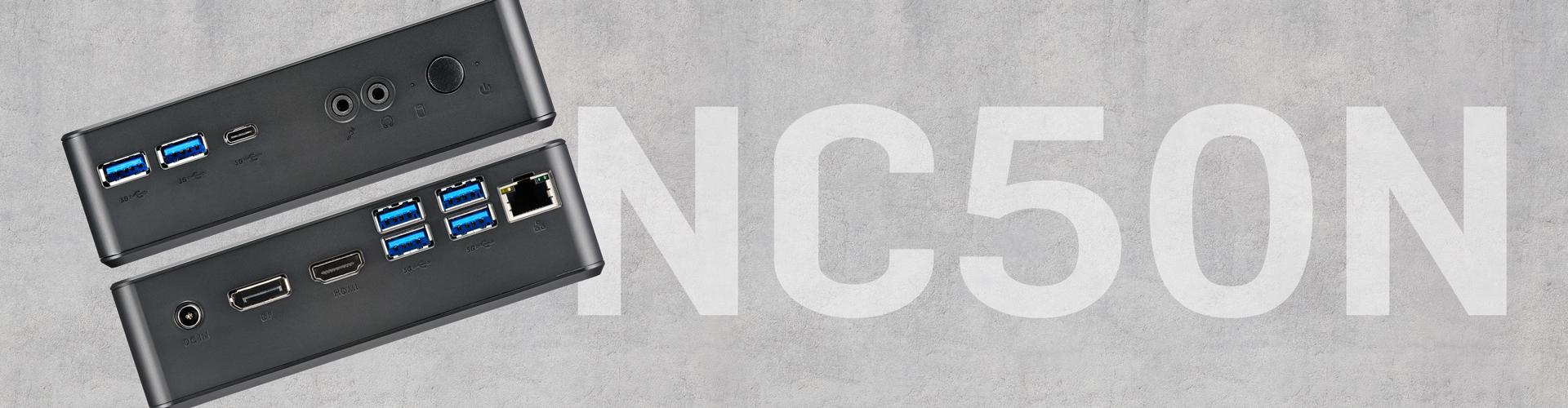
1x USB-C (USB 3.2 Gen 1 at max. 5 GBit/s, no DisplayPort)
2x USB 3.2 Gen 1 Type A (max. 5 GBit/s, blue)
Audio line-out / headphones (3.5 mm jack plug)
Microphone input (3.5 mm jack plug)
Power button
Power LED (blue)
Hard Disk LED (orange) - Back Panel connectors
DisplayPort 1.4a [1]
HDMI 2.0b
4x USB 3.2 Gen 1 Type A (max. 5 GBps, blue)
RJ45 port supports 2.5G LAN (Intel i226LM chip)
1x DC-input connector for external power adapter (5.5 / 2.5 mm) - Connections on the right side
2x perforation (6.5 mm diameter) for optional external WLAN antennas - Always-On Jumper
By removing Jumper JP1 (please refer to the Quick Installation Guide)
the system will start unconditionally once power is applied. [3] - Clear CMOS Jumper
Short Jumper JP2 for about 10 seconds to restore factory settings of BIOS. - Power Adapter
External 65 W power adapter (fanless)
Input: 100~240 V AC, 50/60 Hz, max. 1.6 A
Output: 19 V DC, max. 3.42 A, max. 65 W
DC cable ca. 180 cm with coaxial connector: 5.5 / 2.5 mm (outer/inner diameter)
The DC-input of the computer supports 19V±5%.
AC cable, ca. 180 cm, 3-pin Micky MM C5 plug and Schuko earthed safety plug - Supplied Accessories
Multi-language Quick Installation Guide
Driver DVD for Windows 11
VESA mount set (two parts), made of steel, supports 75 x 75 mm & 100 x 100 mm
with six screws (4x M4x10, 2x M2.5x3)
Bracket for a 2.5" drive with four screws (M3x5)
Two aluminium stands (110 mm width) with four screws M3x7 for vertical operation
Four black, rounded rubber feet, ca. 10 mm diameter x 2.5 mm
Three screws for mounting of M.2 cards (M3 x 4)
Two self-adhesive thermal pads for M.2 SSD cards (70 x 20 x 10 mm and 70 x 20 x 8mm)
Power adapter 65 W with AC power cord - Optional Accessories
- WLN-M12: WLAN module with external antennas [4]
- PS02: two feet for vertical operation - Environmental Spec
Operating temperature range: 0~40 °C [2]
Relative humidity range: 10~90% (non-condensing) - Conformity/Certifications
EMI: CE, UKCA, FCC, BSMI, RCM, VCCI
Safety: CB IEC60950/62368, cTUVus (UL 62368), BSMI
Other: RoHS, Energy Star, ErP
This device is classed as a technical information equipment (ITE) in class B and is intended for use in living room and office. The CE-mark approves the conformity by the EU directives:
(1) 2004/108/EC relating to electromagnetic compatibility (EMC),
(2) 2006/95/EC relating to Electrical Equipment designed for use within certain voltage limits (LVD),
(3) 2009/125/EC relating to ecodesign requirements for energy-related products (ErP)
[1] How to convert DisplayPort into HDMI/DVI
The DisplayPort outputs can be converted to HDMI or DVI by an additional, passive adapter cable. For example:
DELOCK 82590: 1 m, DisplayPort (male, 20p) to HDMI-A (male, 19p)
DELOCK 82435: 5 m, DisplayPort (male, 20p) to DVI-D (male, 24p)
The integrated graphics automatically detects the connected display and puts out the appropriate electric signal - either DisplayPort (without an adapter) or HDMI/DVI (with an adapter).
[2] Caution: For high ambient temperatures over 35 °C we strongly recommend to use SSDs (supporting at least 70 °C) instead of hard disks. Ensure free circulation of air amongst the PC and ventilation holes must stay clear.
[3] Power-on after Power Fail:
The BIOS setup provides a "Power-on after Power Fail" function that can be found under "Power Management Configuration". This function determines the PC's behaviour after power failure. As a matter of the nature of this function, it may fail after short power failures. This is why this PC also comes with a hardware-based solution. By removing Jumper JP1 (please refer to the Quick Installation Guide), the system will start unconditionally once power is applied.
[4] Optional Wireless LAN module:
This Nano PC can optionally be upgraded with WLAN/Bluetooth functionality. Shuttle offers the suitable accessory kit "WLN-M12", consisting of a WLAN card in M.2-2230 format and two external antennas with appropriate antenna cables.
Note: two internal antennas are already pre-installed and can also be used instead.
[5] The built-in button cell battery on the mainboard supplies the CMOS memory and the Real-Time Clock (RTC) with power. Model: "Lixing KTS CR2032" (voltage 3V, capacity: 0.66Wh, dimensions: 20 mm Ø x 3.2 mm. Dispose of only at official collection points; do not throw into household waste! Safety instructions: this button cell battery can cause serious or fatal injury within 2 hours if swallowed. Not intended for children under the age of three. Detailed information (specification, manufacturer, certificates, replacement) can be found in the PDF version of the product specification.